Showing posts with label Stuck Batch. Show all posts

Tuesday, June 23, 2015

Batch Stuck in Dynamics GP

In all financial systems, Dynamics GP included, from time-to-time batches will get stuck during posting. I have experienced this problem in every financial system I have supported, and I've supported a few. In most systems, this problem is something you need to contact technical support to resolve.

A few versions ago, Microsoft included a feature in Dynamics GP meant to manage this issue at the user level - very cool. The tool is known as the Batch Recovery Routine. Accessed in Dynamics GP by clicking on Tools > Routines > Batch Recovery -- see image one below


Image 1 - Batch Recovery Routine Navigation

When a batch is not balanced, a computer or network connection goes to sleep, or someone trips over a power cord...  a batch gets stuck in posting. When this happens, the first step in resolving the problem is to access the Batch Recovery window -- see image two below.
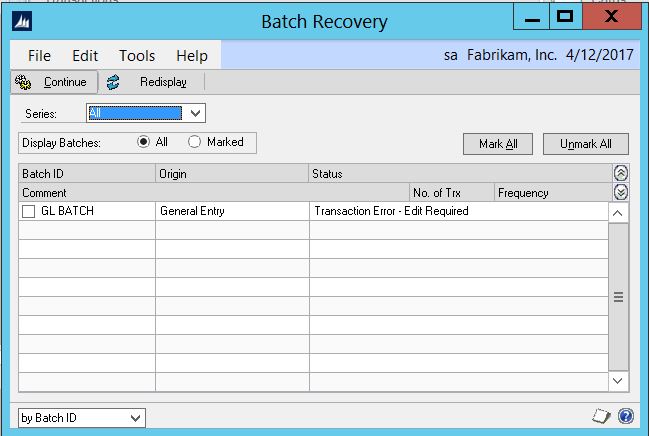

Image 2 - Batch Recovery window
From the Batch Recovery window, stuck batches can be reviewed, and steps can be taken to resolve the problem(s) preventing posting. Selecting the batch and clicking continue will either continue the posting process or push the batch back to the Batch Entry window for editing. If the batch cannot be opened for editing, and displays any number of errors about being edited by other users, or selected for posting, etc., more finesse will be required. 


The next step in the troubleshooting process is to get everyone out of Dynamics GP, then view the contents of the following tables to verify that all users are logged off: DYNAMICS..ACTIVITY, DYNAMICS..SY00800, DYNAMICS..SY00801, TEMPDB..DEX_LOCK, and TEMPDB..DEX_SESSION.  

This is important, because sometimes, there really is another user locking the batch, and in other cases the lock is a glitch/remnant of a connected user.  Run the following queries in SQL query analyzer (SQL Server Management Studio) - the queries call out the databases they access.

SELECT * FROM DYNAMICS..ACTIVITY
SELECT * FROM DYNAMICS..SY00800 
SELECT * FROM DYNAMICS..SY00801 
SELECT * FROM TEMPDB..DEX_LOCK 
SELECT * FROM TEMPDB..DEX_SESSION

Note, when all users are logged off from Microsoft Dynamics GP, these quiries will not produce any results. So, if there are still records in these tables, they need to be removed. To clear the stuck records use all of the following scripts - if a table is empty already, they will do no harm.

DELETE DYNAMICS..ACTIVITY 
DELETE DYNAMICS..SY00800 
DELETE DYNAMICS..SY00801 
DELETE TEMPDB..DEX_LOCK 
DELETE TEMPDB..DEX_SESSION

If no results were returned, then the batch isn't locked, and only needs to be reset in the SY00500 table -- this table exists at the company, not system level. Replace XXX with the batch number or the name of the batch that you are trying to post or select in Microsoft Dynamics GP and run the query below against the company database (when folks get no results here, they typically find they are connected to the master or DYNAMICS database.

UPDATE SY00500 SET MKDTOPST=0, BCHSTTUS=0 where BACHNUMB='XXX'

In order to implement the fixes described above you will require SQL Skills and access to SQL Query Analyzer. If those are foreign concepts, be nice to the nerds in your life. Your GP Partner, Company DBA or Outsourced IT resource will likely be able to run these queries for you.

Sunday, June 21, 2015

Dynamics GP Stuck Process and Process Monitor

From time to time, I will receive a call from a customer who has posted a transaction, and is deeply concerned that nothing appears to be happening. More often than not, the problem turns out to be a report sent to screen, which was minimized and is blocking further processing.

It is not uncommon for a user who is about to post a transaction in Dynamics GP to print an edit list of the transaction to screen. If the user does not close the window containing the report, all future reports and processes will be held, until it is closed.

Imagine if you will, a user in Finance prints an edit list for a General Ledger transaction in preparation for posting.


Now the same user receives a phone call, and has to open another Dynamics GP window or External Application to answer a question or two, or three, etc. etc. etc. Several minutes pass, and the user returns to Dynamics GP to post the transaction.

Upon posting, nothing appears to happen. The Posting Journal report does not open. The user, being a savvy Dynamics GP user immediately opens the Process Monitor to view the status of the Batch.


The report open on the screen does not show in the Process Monitor window because technically, it has completed processing (technically). This is the first sign an open report printed to screen is the culprit -- the General Posting Journal is the next process in the cue. At this point the user should be looking at the open windows in Dynamics GP in order to find the window causing the hang up.

Once the window is identified, it must be closed. Immediately after the window closed, the processes being held up will continue until completion. In this case the General Posting Journal is printed and the batch posting is completed.


Once the processes complete, the Process Monitor window will be empty, and normal processing in Dynamics GP can be continued.


This type of problem is an infrequent occurrence and has an easy diagnosis and solution; therefore it has not been a priority addressed in recent releases. I for one would like to see the problem rectified, but understand the cascading problem it represents.

A report being run to screen prevents other reports from printing. A posting report being printed is a requirement of the posting process being completed. You see where this is going, right...

My humble suggest would be to enable Dynamics GP to render multiple reports to screen, instead of just one.