Showing posts with label Management Reporter Navigation List. Show all posts

Monday, June 8, 2015

Dynamics GP 2015 Management Reporter Integration Features

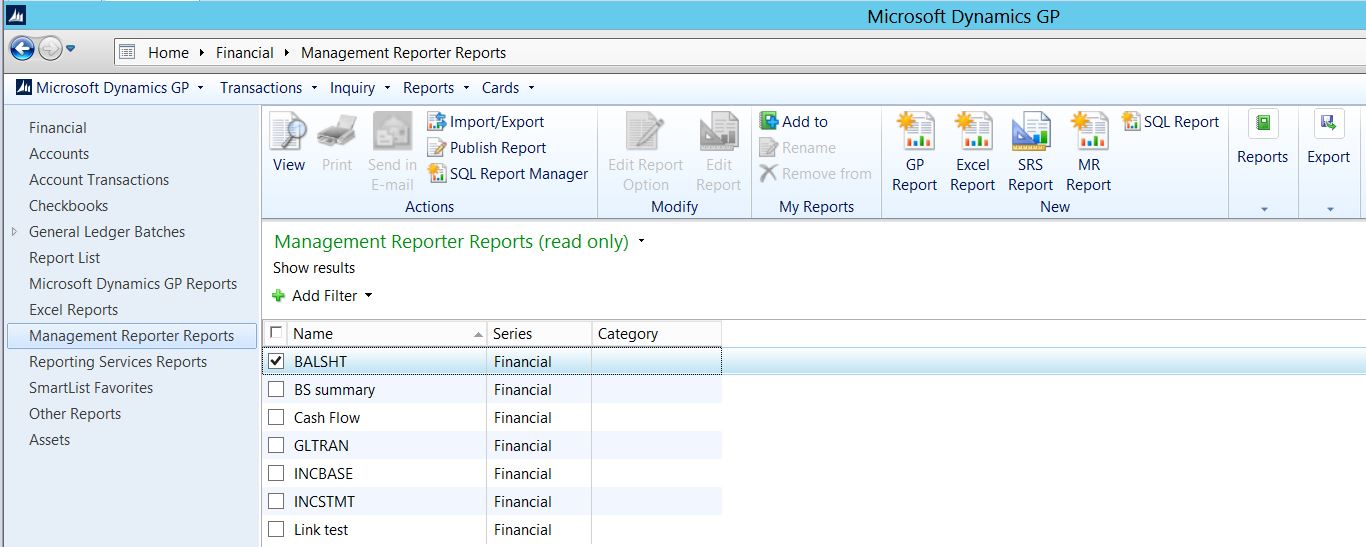
With the release of Dynamics GP 2015 the integration of Management Reporter has been significantly expanded. A new Navigation List has been added which allows users to open Management Reporter reports from within Dynamics GP. Management Reporter reports can be added to My Reports, and of course Management Reporter Designer can be opened from within Dynamics GP as well. Image 1 below is a preview of the Navigation List:


Image 1 - Management Reporter Navigation List
To add the Navigation List displayed in Image 1 above, the administrative task of deploying it must be performed in Reporting Tools Setup, which is accessed via the following navigation: Microsoft Dynamics GP > Tools > Setup > System > Reporting Tools Setup (or) Administration > Setup > System > Reporting Tools Setup.

Image 2 - Reporting Tools Setup
The URL for the Management Reporter Service should be the same as the URL entered when installing the Management Reporter Client, including the port number (the default port number is 4712).

The Location of the Report Designer.exe must be consistent, as this setting is maintained in this one location. So, it is best to use the default directory when installing the Management Reporter Client application on user workstations.

You must select the company or companies to deploy the Navigation List to.


Image 3 - Company Selection in Reporting Tools Setup

Finally, after successfully deploying the Navigation List, users, must log out and back into Dynamics GP to view it. 

The tighter integration between Dynamics GP and Management Reporter is a vast improvement over the integration between Dynamics GP and FRx and let's hope a sign of things to come.